Storyboard your photos with an AI that sees your board
Lay your own photographs out on an infinite canvas and arrange them into a sequence. A chat docked to the board reads how they sit, where the hole is, and tells you what is missing using your own archive.
Shooting commercial work? Try the commercial demo →
No credit card required · The demo needs no account
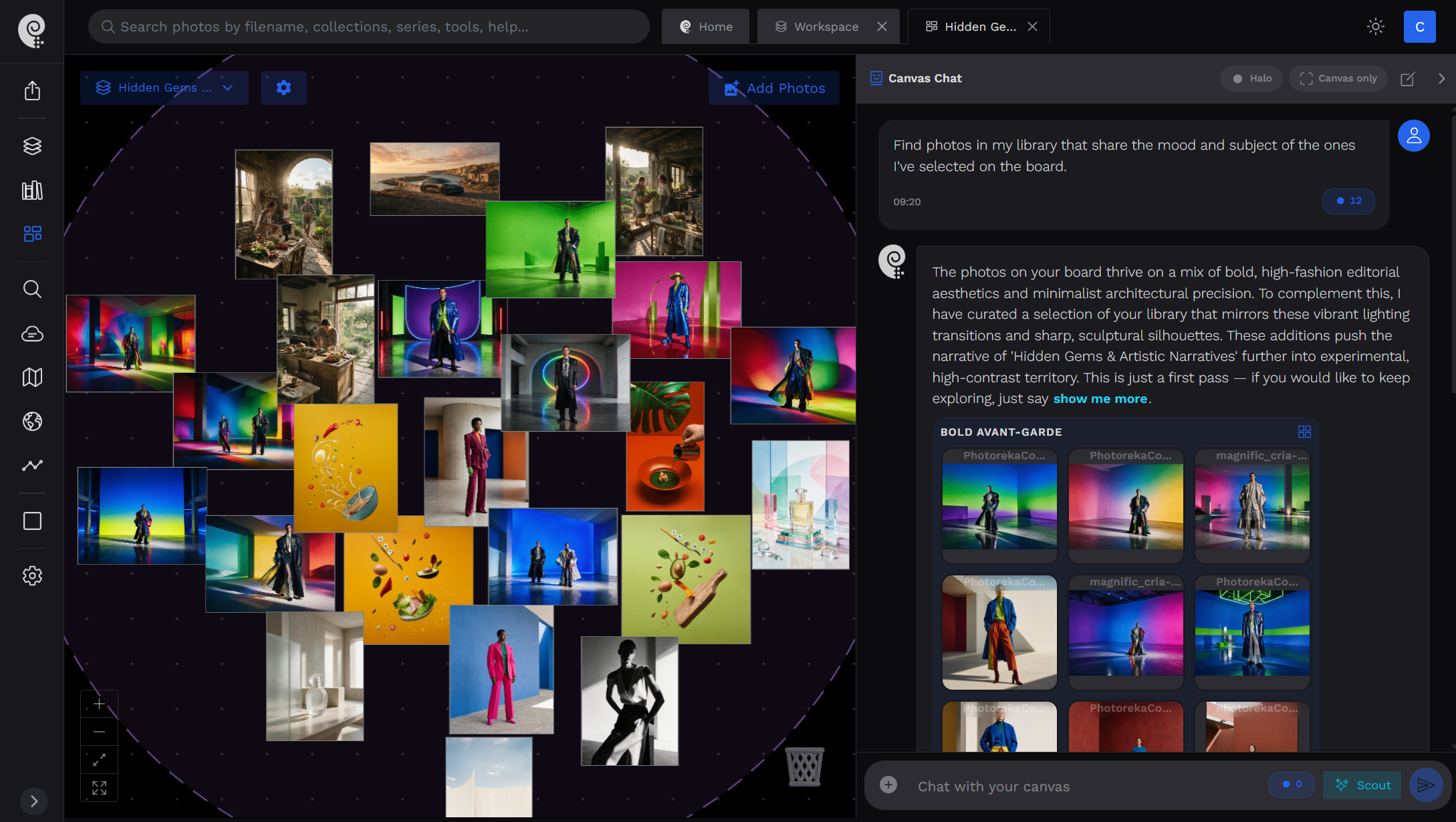
Every other AI storyboard tool draws the frames. This one finds yours.
A storyboard made of invented images is a mockup. A storyboard made of your own photographs is an edit — the thing you can actually print, hang, publish or send.
- Invent frames from a text prompt — nothing you actually shot
- Output is a mockup you still have to go and photograph
- Know nothing about the archive you already own
- Consistency is a model problem, not an editing decision
- Built for pre-production: planning a shoot that has not happened
- Every frame is a real photograph from your own catalog
- The output is a finished edit — printable, publishable, sendable
- Reads a library of thousands and remembers what you forgot you had
- Consistency is judged across your real work, by score and by look
- Built for post-production: making sense of what you already shot
You never explain which photos you mean
On a board full of pictures, "does this one fit here?" is ambiguous — unless the assistant can see what you marked. Three nested levels turn a gesture on the canvas into the subject of your question.
The board
Every photo you have placed. The widest context — the overall sense of the sequence you are building, and the pool the assistant can profile as a body of work.
Nothing to do. It is what the chat sees by default.
The focus
The stretch of the board you are working on right now. Photos under the halo — an ambient circle that follows your viewport — or a set you pick by hand.
Move the halo over the photos, click them one by one, or Ctrl / ⌘ and drag a box.
The spotlight
The individual frames the question is really about. They can sit inside the focus, or be held up against it from elsewhere on the board.
With a focus set, press the spotlight button on any photo.
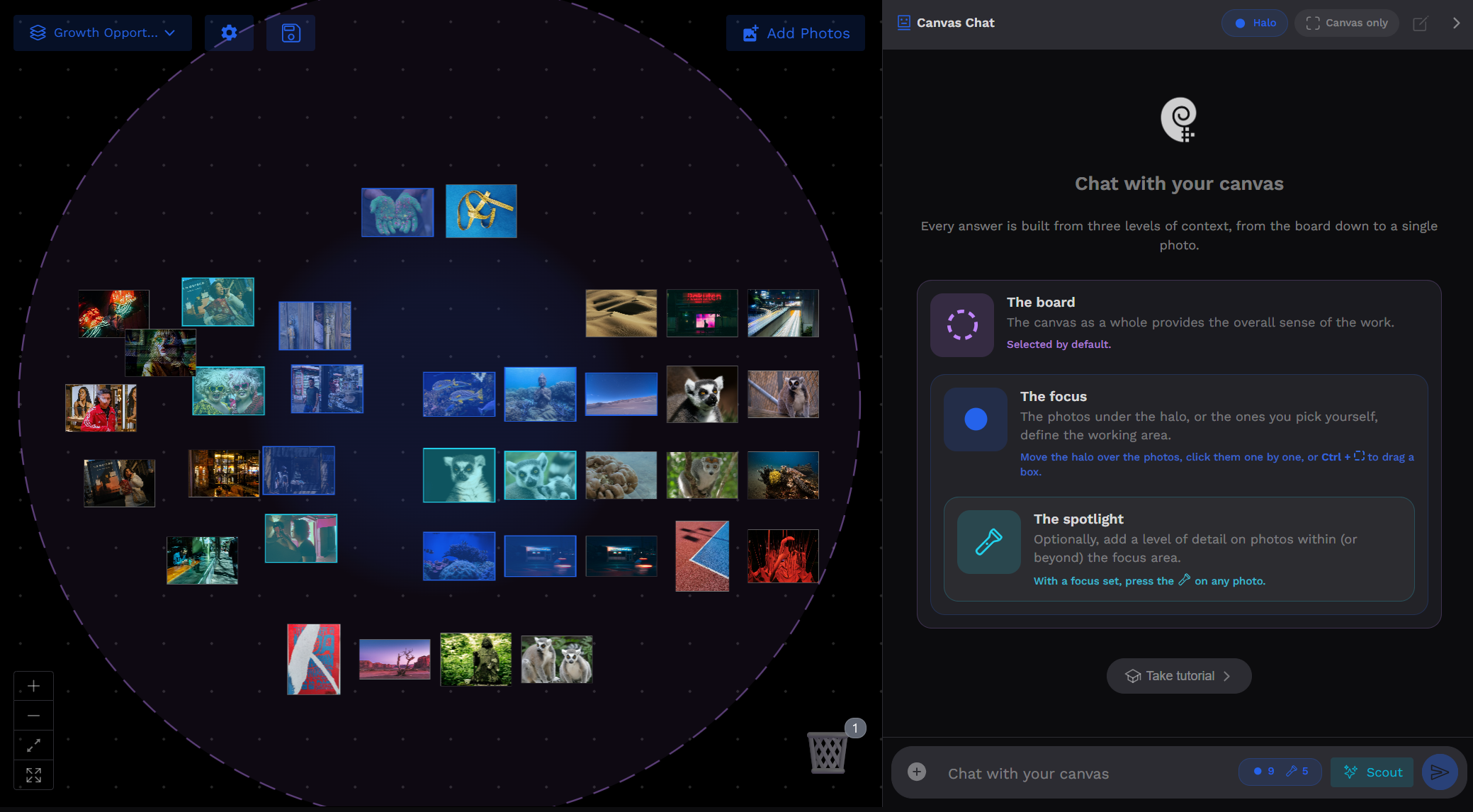
The finest level you marked is the subject of the question. Everything wider than it is context — which is exactly how you already think when you stand in front of a wall of prints.
How to storyboard your photos with AI
Five steps from a pile of frames to an ordered sequence you can defend.
Drop your photos on an infinite board
Pull frames from your catalog onto a canvas with no edges and arrange them by hand — left to right, top to bottom, the way the story should read. Nothing snaps to a template; the layout is the edit.
Mark what you are working on
Slide the halo over a stretch of the sequence, or drag a box around it. Spotlight a single frame when the question is about that shot alone. The marks on the board are how you address the assistant.
Ask about the sequence, not just the photos
The arrangement travels with your question as a grid — neighbours, rows, gaps, whether two clusters read as separate groups. So 'does this belong here', 'what breaks the rhythm' and 'what goes in the hole' are answerable, with the position named.
Pull the missing frame out of your archive
The assistant searches your own library for work that would sit well beside what you have out — matched on look, narrative, palette or setting, your choice. Photos already on the board are held out, so every result is genuinely new. Drag any of them from the reply onto the canvas.
Let it lay a proposed order out for you
When a reply groups photos into a sequence, one click places them on the board in that exact order, as a block. Then you do what you were always going to do: move two of them and change your mind about the ending.
Everything the canvas does on its own
Before a single word is typed, the board is already a proper editing table: infinite space, real drag-and-drop, and your archive one gesture away from any photo on it.
An infinite, freeform board
Pan and zoom across a canvas with no edges. Photos go anywhere, at any size, in any order — no grid, no template, no slots to fill. Dot grid, background colour and auto-align are yours to switch on or off.
Related photos, one gesture away
Select any photo on the board and a strip fills underneath with visually and narratively related work from your archive. Drag them straight up onto the canvas — the board grows out of the frame you are looking at.
As many boards as you have projects
Create, name, switch and duplicate canvases. Each is saved with its own photos, its own arrangement and its own conversation, so a book edit and a client moodboard never collide.
Real arranging, not slideshow ordering
Stack, overlap, cluster, leave a hole where the missing frame goes. Two photos side by side with a third hanging below them means something — and the assistant reads that geometry the same way you do.
A trash you can walk back
Drag a photo to the bin to take it out of the edit. It leaves the board and stops being proposed, but nothing is deleted — reopen the bin and pull it back whenever the sequence changes its mind.
Fit, unstack, zoom, tidy
Frame the whole board in one click, spread a pile of overlapping frames apart, or zoom into a run of three. Small tools, but they are the difference between a working table and a mess.
Send a selection anywhere
Select photos on the board and push them into a collection, a series, a portfolio, another tool, or a chat — or download them. The canvas is a stage in a workflow, not a dead end.
A live demo board, no account
Open a canvas that already has a real catalog behind it and try the whole thing — arranging, the related-photos strip, the chat — before you commit an archive of your own to it.
Pick any photo on the board and ask for more like it — on your axis
"Similar" is not one thing. A frame can rhyme with another by colour and clash with it narratively. Choose which kind of resemblance you are extending, and the strip under the canvas fills with candidates you drag straight up onto the board.
General
Broad visual and semantic resemblance — scene, subject and overall style at once. The honest default when you just want more of this.
Narrative
What is happening, and how it feels to watch it. The one that matters when you are building a story rather than a wall of matching pictures.
Chromatic
Palette and colour distribution. For a sequence that has to hold together on a page, or a spread that must not clash.
Context
Places, environments, symbols and cues. Finds the frames shot in the same world, even when they look nothing alike.
Technical
Framing, light and treatment. For matching the physical craft of a shot rather than what it depicts.
Photo tags
Match on the concepts the AI already extracted from your archive — pick the ones that matter and search on those alone.
What changes when the assistant is looking at the board
A general photo chat knows your catalog. This one also knows the arrangement in front of you — and that turns questions about sequence, rhythm and gaps into questions it can actually answer.
It reads the arrangement, not just the photos
The board's geometry travels as a grid: what is next to what, what sits above or below, where the empty slot is, whether two clusters read apart. That is why it can say 'it breaks the run in the second row' instead of a generic opinion.
It knows what you pointed at
Board, focus, spotlight. You mark the level on the canvas and the finest one becomes the subject of the question — so 'these', 'here' and 'this one' all resolve to the photos you actually meant.
It searches your archive on the axis you name
'More like these' anchors on the photos you marked. 'The same palette as these', 'narratively like these', 'in this vein but only verticals' — it switches what similarity means, and combines it with hard constraints when you set one.
Its answers are draggable
Every photo in a reply can be dragged straight from the panel onto the board. Frames already placed are excluded from search results, so nothing it shows is something you have already used.
It can lay a whole sequence out
When a reply proposes a run — an opener, a middle, a closer — one click places those photos on the canvas in that order, as a block. The proposal becomes something you can look at, not just read.
It can profile the board as a body of work
Recurring subjects, dominant lighting, palette, score averages, where and when it was shot. Ask what the canvas is actually about and it answers from the board itself — never confusing it with your catalog at large.
Canvas only: stay inside your own edit
One switch confines every search to the photos already on the board. The conversation stops proposing new material and starts reading what you have: which frames are weakest, what repeats, whether the set holds.
One conversation per board, kept with it
Each canvas keeps its own thread, stored with the board rather than in a chat history. Reopen a project on another device six weeks later and the discussion about that sequence is still there.
What you actually ask a board like this
The same question means something different depending on what you marked. Write in whatever language you think in — the assistant answers in it.
What photographers storyboard here
Any body of work whose order carries meaning.
Photo essays and documentary stories
Find the opening frame, the turn and the closer, and check the middle is not sagging.
Photo books and zines
Lay out spreads as they will be read, and test whether facing pages actually talk to each other.
Exhibition walls
Arrange in rows and clusters exactly as they will hang, gaps and all, before anything is printed.
Portfolio and competition edits
Cut a large body of work down to the frames that earn their place, and defend the order.
Client moodboards and pitches
Build a board from your own back catalog to show a direction, instead of borrowing someone else's references.
Making sense of a shoot
Spread a day's take out, group what belongs together, and find out whether there is a series in there at all.
The board sits on top of the rest of Photoreka
Every photo it offers has already been searched, scored and understood by the same engines that power the rest of the app.
- AI Photo Assistant — the same conversation without a board: critique your portfolio, track how your work has changed, ask anything about your archive.
- AI Photo Search — describe a frame in plain language and find it in seconds, no tagging required. It is what fills the board.
- AI Portfolio Builder — when a sequence graduates into a finished edit, it builds and orders the full portfolio for you.
- AI Photo Scoring — the aesthetic, narrative and originality scores behind "which of these is strongest".
Frequently Asked Questions
What photographers ask before storyboarding their own photos with AI
Put your photos on a board and start
Arrange, question, replace, reorder. The archive is yours and so is the edit — the assistant just never lets you forget what you already shot.
Shooting commercial work? Try the commercial demo — the same board on a product and packshot catalog.